The idea started when a friend bought a BenQ Full HD projector. I helped him set it up at his home, and seeing that large projected picture made an impression on me. There was something about the scale of it that gave the room a cinematic feeling. It made me want to try projection at home too.
That led me into reading about projectors. With 4K becoming a much bigger part of the conversation in 2018 and 2019, there was plenty to read. My friend's Full HD picture had already shown me the appeal of a large image. Once I started looking at what was available, I became interested in how much detail I could get into one.
I soon found that accepting a 4K signal and having a native 4K imaging panel were different things. I wanted a projector with the physical pixels to form the image, so I started looking more closely at how the different machines worked, rather than relying on the 4K label alone.
The native 4K Sony and JVC models caught my attention, but their prices were far beyond what I wanted to spend. Buying one would have been a substantial commitment for something I had only recently become interested in. I liked the idea of that picture at home; I was much less comfortable with the cost of getting it.
I also looked at Epson's approach. The models I was considering used Full HD LCD panels with 4K Enhancement, or pixel shifting, rather than native 4K panels. The system projected successive images with a small diagonal offset to put more detail on the screen. This involved actual optical shifting, alongside image processing, rather than simply upscaling a picture and displaying it on a stationary Full HD pixel grid. But the underlying panels were still 1920 × 1080. I wanted the real thing, with all 8.3 million pixels present and accounted for. Apparently, I was already getting fussy.
Then I had a light-bulb moment: what if I could build one myself?
It was a fairly wild idea. My immediate reaction was that building a native 4K projector might be a bit too ambitious, even for someone who enjoyed making things. I did not yet know what would be involved, let alone whether I could pull it off. But before dismissing it, I thought, let me Google it first.
From the idea to a working prototype
Finding out whether the idea was possible
That search was encouraging. People had already been making hobby projectors using old laptop and monitor LCD panels. Removing the original backlight allowed a separate light source to shine through the image-forming panel. Some builds placed a stripped LCD over an overhead projector. That made the idea much easier to understand: the LCD could act as an electronically changing transparency.
The basic idea of projection takes me back to school: a single converging lens, a surface on the other side, and an image appearing upside down when the distances were right. That little piece of classroom optics suddenly had a much more interesting use. An LCD could supply the changing image, and a projection lens could enlarge it onto the wall. The principle felt familiar. Making it work with a large, fragile 4K panel was where the real work would begin.
Commercial projectors had also been using LCDs for many years. The established 3LCD approach uses three small panels, one each for red, green and blue, then combines their images before projection. Epson's VPJ-700, introduced in January 1989, already used three LCD panels. That is a more specialised optical arrangement than shining white light through one colour LCD, but it confirmed that LCD image projection was well established.
That gave the wild idea a practical starting point. I would try to build around a native 3840 × 2160 LCD, then work out how to illuminate it, project its image and keep the whole assembly cool. There was still a lot to learn, but I could now see an approach worth investigating.
I am not setting out to build a whole home cinema. For now, I want to make this projector work. Helping with my friend's BenQ has given me more than enough ideas to get started.
Electronics has been a hobby since my teenage years. I started with LED runners, lighting circuits, radios, short-range transmitters and audio amplifiers, then moved into Atmel AVR programming and projects involving small servos. Around 2012 to 2013, I also designed and built my first 3D printer. That printer would now help me build something quite different.
Turning the wild idea into a prototype
This project gave me a reason to bring those interests together. The printer could make custom mechanical parts, and the microcontroller experience would help with the controls. The optical system was another problem to work through.
The whole project is an experiment for me, and the chance to expand my knowledge and skills is a big part of the attraction. It gives me a reason to revisit textbook ideas about focal length, image formation, magnification, heat transfer and structural loads, then find out what they mean with real parts on the bench. I want to understand why a choice works, what happens when it does not, and how to improve the next version. Getting a projector working is the goal, and working through all of that is part of the enjoyment.
My software engineering background immediately kicked in. Rather than expecting to get everything right on the first attempt, I thought I would approach it as real-world evolutionary prototyping: build a version, test it, learn from it and improve the next revision.
Having my own 3D printer made rapid prototyping a practical part of that approach. I could design a part, print it, try it in the assembly, then revise the design and print it again. A fit or alignment problem became something I could work through in the next iteration.
Design → Print → Try → Revise → Repeat.
That has been the approach with the optical holders and mounts: try the design in PLA, then make the final parts in black PETG once I am happy with it. The physical build gives me feedback that a drawing alone cannot.
Working out what needed to be inside
Once I knew an LCD-based approach was possible, I needed to understand the rest of the machine. The hobby builds gave me somewhere to start, but I still had to learn what each component did and how the parts worked together. An LCD and a bright light sounded like a start. They were certainly not the whole shopping list.
The light source and driver
The LED would supply the illumination; a suitable driver would regulate its current. I needed useful light from a compact emitting area, with a plan for carrying away the heat it produced. A big wattage on a listing would not answer all of that.
The condenser and rear Fresnel
The LED sends light out over a range of angles. The condenser collects some of that spreading light, while the rear Fresnel helps produce approximately parallel illumination through the LCD. That is collimation. Without it, too much light could miss the useful optical path.
Fresnel lenses caught my interest because they can do this without the bulk of a conventional lens of similar aperture and focal length. Their stepped surfaces divide the curved profile into narrow zones, reducing the thickness and material needed. The principle became famous through Augustin-Jean Fresnel's lighthouse optics in the early 1820s. A lens installed at Cordouan in 1823 helped establish the approach. Later uses include overhead projectors, magnifiers and illumination systems. It was rather pleasing to find lighthouse optics turning up in a projector I wanted to build at home.
The plastic Fresnels I could buy were much less imposing than a lighthouse lens, but that combination of large aperture and low weight was exactly what made them interesting for this build.
The LCD and its video controller
The LCD supplies the picture. With the original backlight removed, light from my own source could pass through the panel. The controller still had to accept a normal video signal and drive the correct panel at its native resolution. Resolution, orientation and controller compatibility were therefore one decision, not three independent purchases.
The front field Fresnel
The front Fresnel acts as a field lens, directing light from across the LCD towards the projection lens. It helps light from the edges of the panel reach that lens instead of missing it.
The projection lens
The projection lens forms the enlarged image on the screen. Its focal length and position affect the picture size, throw distance and focus. This is where the familiar school lens experiment becomes a practical layout problem.
Cooling, power and controls
There are also parts that do not appear in a simple light-path sketch: the heatsink, fans, power supplies and controls. I needed to cool both the source and the illuminated LCD, switch the power stages in a sensible order, and operate the projector without reaching inside the case. My microcontroller experience would be useful here.
The frame, mounts and enclosure
Finally, everything needs a frame, mounts and enclosure. The optical components had to stay aligned while leaving room for airflow and wiring. If I wanted to hang the finished unit above the seats, the structure and its fastenings would matter just as much as getting the first picture onto a wall.
Once I understood those jobs, choosing the LCD became a much more useful starting point. Its size and orientation would affect almost everything else I was about to build.
July 2019: choosing a panel that fitted the whole system
Finding a suitable panel took some research. I was looking at resolution, viewing characteristics, physical size and the controller needed to feed it a usable image. A panel being advertised as 4K was only the beginning; I needed a combination I could actually buy and connect.
I originally thought a smaller mobile 4K LCD, around 5.5 to 6 inches, would be a good choice. There would be less panel area to illuminate, and it looked like a promising route to a more compact projector. Small 4K displays were already an option: Sony announced a 5.5-inch 4K UHD display in the Xperia Z5 Premium in 2015. Sony's 2015 announcement.
I found OEM mobile-panel kits on AliExpress with matching controller boards. Some of the options I looked at used MIPI DSI panels with 60-pin connectors. The matching board mattered: a connector with the same number of pins would not, by itself, establish compatibility with another panel.
What stopped me was the orientation. The smaller panel/controller combinations I was looking at displayed the image in native portrait format. I needed a landscape picture for movies and videos, which meant finding a way to rotate the video before it reached the panel. Turning the panel physically would not solve that on its own.
I wanted to use an Nvidia Shield as a playback source. The connection I had in mind was straightforward:
Nvidia Shield → AV receiver → projector, with the receiver also driving the speakers.
I knew the AV receivers I was considering would not rotate the picture for me, and I did not know how to make the Shield do it either.
I could have used a computer to rotate its own video output, but I did not want the projector to depend on a computer for normal playback. That would tie the input to whatever I could play through the computer, instead of letting me connect the Shield or another HDMI source directly through the receiver. I wanted a projector I could feed a standard landscape video signal, without making rotation another job for the playback system. That was enough to steer me away from the smaller panel/controller combinations.
I also found the BOE TV101QUM-N00, a 10.1-inch, wide-viewing-angle 4K panel. It looked like the most promising compromise: a smaller panel with the landscape format I wanted. Unfortunately, I could not find one to buy.
The other practical option I could source was the 12.5-inch Sharp panel. I had been looking at IPS and other wide-viewing-angle LCD options, but getting a working landscape display mattered more than choosing the smallest diagonal. I bought the Sharp LQ125D1JW34 through AliExpress, with its native resolution of 3840 × 2160 and a controller arrangement suited to standard landscape video. It solved the input problem, but a 12.5-inch panel is a substantial thing to put inside a projector. The lenses would have to cover it, the light source would have to illuminate its full area, and the case would have to hold all of that in alignment. Choosing the panel had just given the rest of the project its dimensions. Ah. The projector was already getting bigger than I had pictured.
The Sharp also offered an interesting starting point for colour. Its original module specification lists an Adobe RGB gamut ratio of 100% typical, with a 95% minimum. That was encouraging, but it described the complete LCD module with its original backlight. Once I replaced that illumination with my own LED, the projected colours would depend on the LED spectrum, the panel's filters and the rest of the optical path. It was a promising specification to work from, not a measurement of the projector's final gamut. Sharp optical specifications, page 22.
| Panel option | Why it interested me | What decided it |
|---|---|---|
| 5.5 to 6-inch mobile 4K LCD | A small image area to illuminate and a potentially compact optical assembly. | The kits I found needed video rotation, and I did not want playback tied to a computer to handle it. |
| 10.1-inch BOE TV101QUM-N00 | A potentially useful compromise between a small mobile panel and the larger Sharp display. | I could not source one at the time, so I did not test it. |
| 12.5-inch Sharp LQ125D1JW34 | A sourceable native 4K panel with a suitable landscape controller arrangement. | This was the panel I bought and built around, accepting the larger optics and enclosure. |
The Sharp panel and HDMI controller are on the bench below. Before removing the backlight, I wanted to get the display and controller working together.
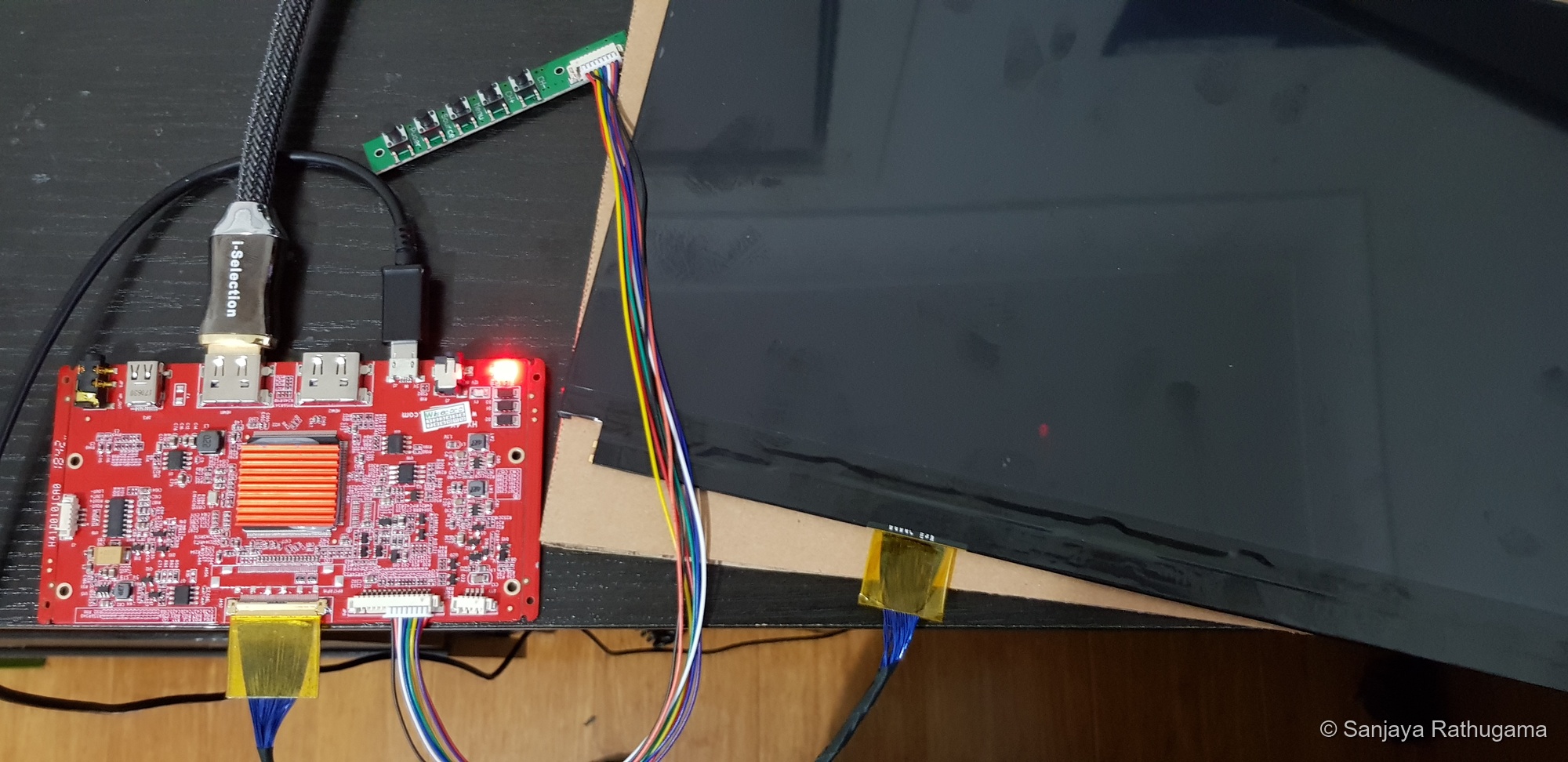
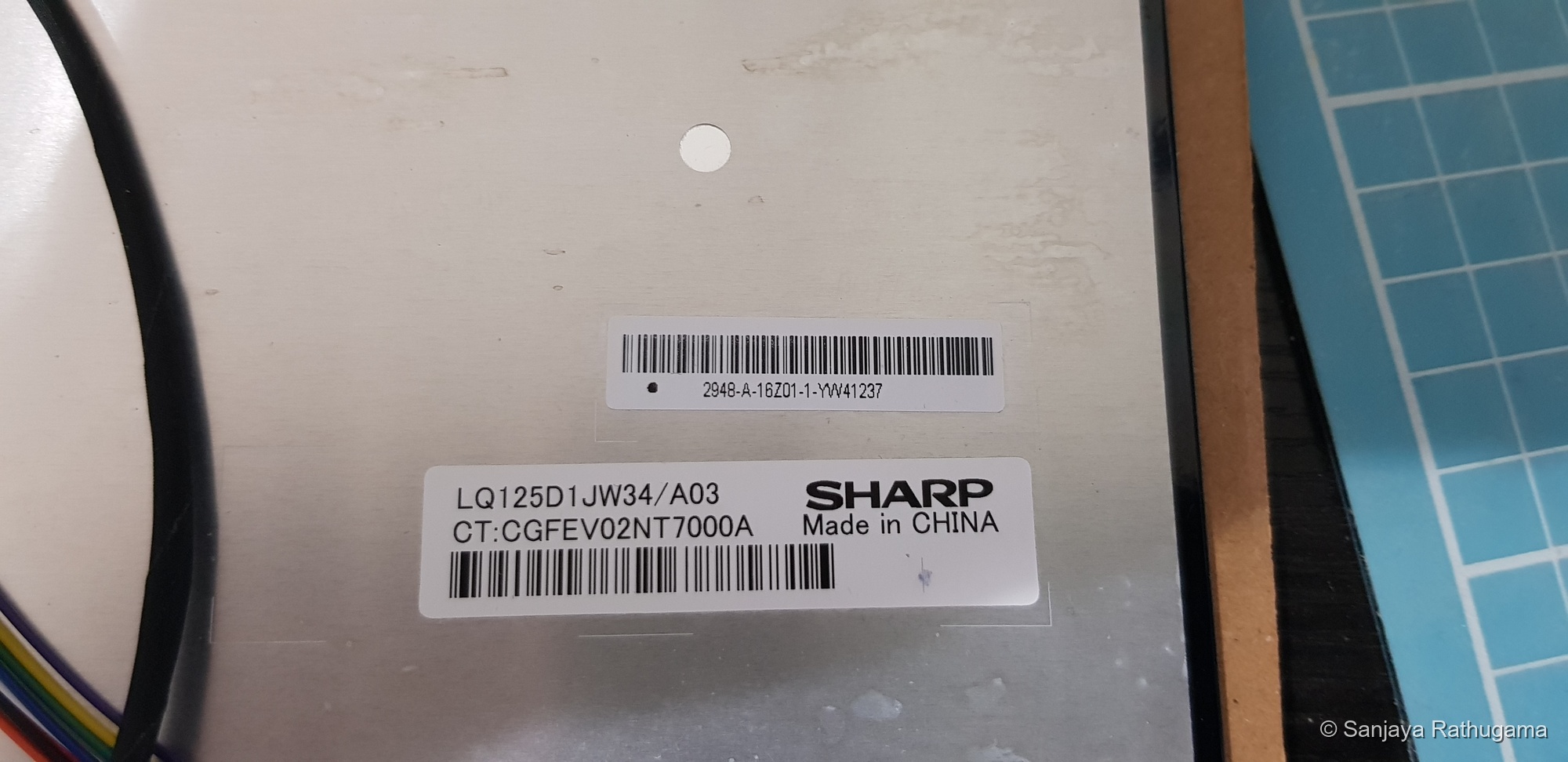
Then I removed the panel's original backlight. I used the bare transmissive LCD, illuminated by my own light source and optics.
A broken LCD and another delivery wait
During assembly, I pushed the first LCD too firmly into its 3D printed frame and broke it.
That hurt. After all the time spent choosing a panel and getting it working, I had broken it while fitting it into a part I had printed myself. I had to order another panel from AliExpress and wait roughly two to three weeks for delivery. The project had gone from working through optics to waiting for a parcel.
The first display was bought in July. By September, I was ordering a replacement bare panel instead of making the progress I had hoped for.
The replacement has got the project moving again. It was an expensive reminder that a fragile LCD and a tight printed frame are a combination that needs patience. This is part of learning by building, although I would have preferred a less expensive lesson.
Designing the optical assembly
The LCD gave me the pixels. Now I had to get light through them and onto a wall. The optical arrangement developed over the following months as I tried parts and revised the layout, rather than arriving as one complete shopping list. The size difference soon made the challenge clear: a display nearly 28 cm wide, followed by a projection lens much smaller than the display. Light passing through the corners of the panel still had to find its way into the projection lens. Otherwise, I could have a perfectly working 4K LCD and a rather disappointing picture.
There was another detail to understand before committing to the layout: the Fresnel grooves themselves. Any additional optical surface can introduce reflections, scattering or aberrations, and the stepped surface of a Fresnel makes it a compromise for image quality. Groove pitch is the spacing between neighbouring grooves. Smaller spacing generally helps image quality, but pitch alone does not determine groove height or guarantee a good result. The groove profile, lens material and position matter too. The Fresnels I used came from AliExpress, with a groove pitch of approximately 0.3 mm.
I also wanted to investigate putting both Fresnels on the illumination side, with the field Fresnel close to the LCD. That would keep its grooved surface out of the path after the panel, but it would change how light passed through the LCD and entered the projection lens. It would need its own alignment and coverage tests, particularly with this rather large panel.
For the first version, I am going with rear Fresnel → LCD → front field Fresnel. It gives me an arrangement I can build, adjust and learn from. The alternative can be another experiment once I have a working baseline.
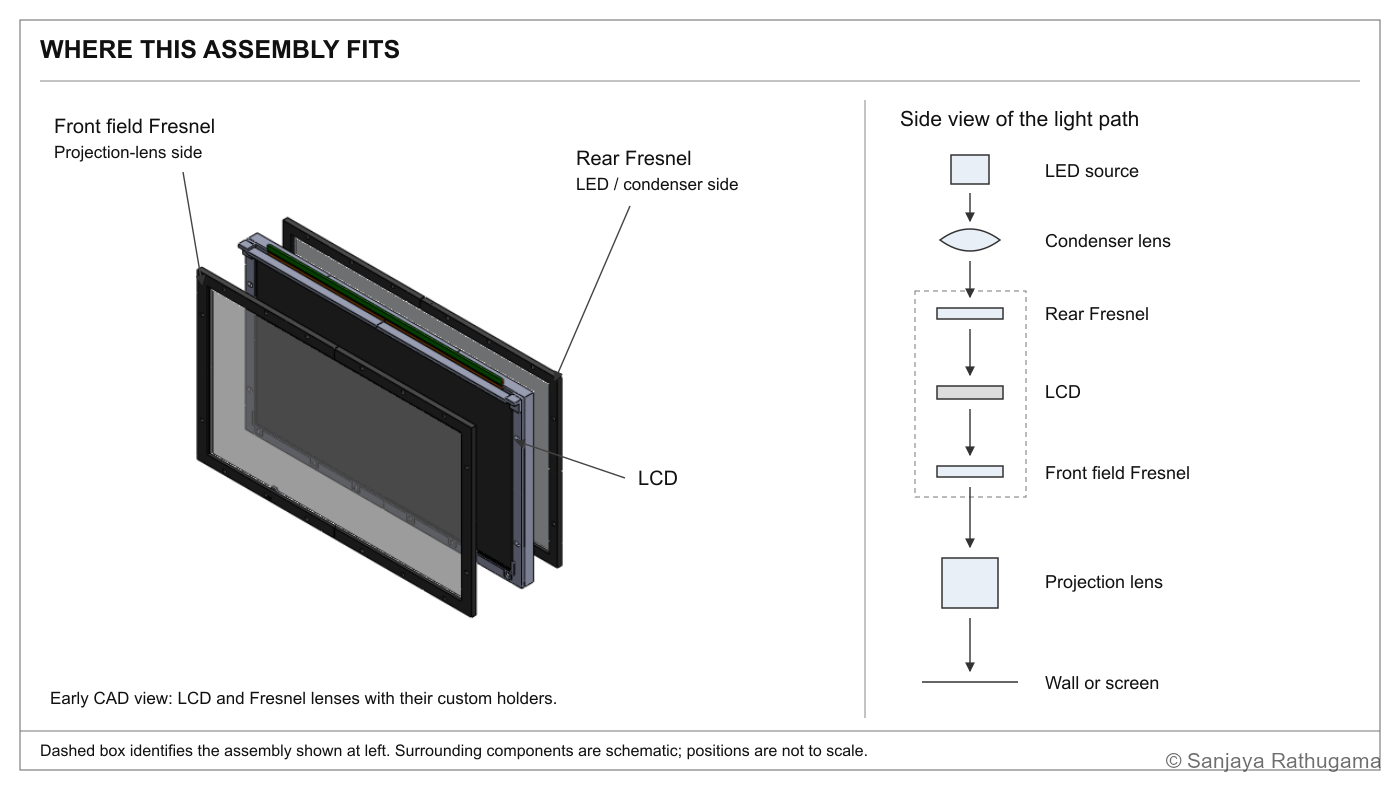
With the basic light path worked out, I could start turning it into something I could hold together on the bench. The LCD and Fresnel lenses needed their own mounts, while the source would sit behind the rear Fresnel and the projection lens in front of the field Fresnel. This early assembly shows the middle of that arrangement. I modelled the assembly in 3D to see how the parts would fit, working through the focal lengths and spacings alongside it. The drawing and calculations had to develop together; a neat-looking model would be little use if the lenses could not form the picture I wanted.
Turning focal lengths into a physical layout
The panel size set the first requirement. Its active image area is 276.48 × 155.52 mm, so a Fresnel intended for a small phone display would not do. I needed lenses large enough to cover the whole image, with mounting openings that would not clip it.
For this layout, I chose a rear Fresnel with a 220 mm focal length and a front field Fresnel with a 330 mm focal length, approximately 280 × 165 mm and 285 × 168 mm respectively. These were components to build and test an arrangement around, not numbers that guaranteed a finished optical system on their own. The lens sizes answered the coverage requirement; the focal lengths governed how I could collect and redirect the light within the available space.
Focal length was a layout constraint, not simply a product specification. In an ideal collimating arrangement, the effective source lies at the collimator's focal plane. Because I also used a condenser, that did not mean I could simply measure 220 mm from the physical LED and assume everything was correct. The illumination optics had to be considered together.
The front 330 mm Fresnel had a different job: guide the transmitted light towards the projection lens. It needed to work with the lens position, rather than simply sit at a convenient distance from the LCD. Its focal length was not the LCD-to-projection-lens spacing. That spacing came from the projection lens and screen distance. I had to keep those relationships straight before turning them into mounting positions.
I planned to repurpose the room designated as the TV room for the projector. Its 4 m length gave the optical calculations a real setting: I was working towards a projection distance of roughly 3.6 m, rather than designing for an arbitrary room.
The next question was how to turn that 12.5-inch image into the picture I wanted on the wall. My target was 120 inches diagonally, roughly 9.6 times the panel's diagonal. The picture size, lens position and space for the projector itself all had to be considered together. That meant working backwards from the room and the image I wanted, rather than picking a projection lens by its focal length alone.
My initial calculations use an F345 projection lens with a stated 63 mm diameter. Here, F345 means a nominal 345 mm focal length. For a first approximation I used the thin-lens relationship, 1/f = 1/u + 1/v, where u is the LCD-to-lens distance and v is the lens-to-screen distance, measured from the appropriate optical reference planes.
For example, with a screen distance of approximately 3.638 m, the 345 mm thin-lens calculation gives an LCD-to-lens distance of approximately 381.1 mm. That already makes for a substantial assembly before adding the illumination system behind the LCD.
The size of the picture also came with a bill to pay in light. Increasing magnification spreads the available illumination over a larger screen area. Getting the geometry right would only be half the job; the image still had to be bright enough to enjoy.
The lens trials brought that work off the page. I also ordered an F260 projection lens from AliExpress in October and tried it in the assembly, but in my setup it did not cover the whole LCD image. Getting a picture through the centre was encouraging; losing part of the image was not. I have settled on the F345.
That test made image-field coverage a very practical concern. Focal length affects throw and internal spacing, but it does not tell the whole story about coverage. Lens design, clear apertures and the rest of the optical layout matter too. This particular F260 did not work with my arrangement; it was a result to act on, rather than a reason to assume every 260 mm lens would behave the same way.
I have explored other trial spacings too. These calculations get the components into a useful starting range; the adjustable frame lets me refine focus, coverage and alignment with the actual lenses.
For early testing, I attached my printed optical holders to a 20 × 20 mm aluminium extrusion frame. That gave me an adjustable arrangement in which to test the components and refine their positions. Small adjustments to spacing and alignment were much easier to make there than after committing everything to the enclosure.
The adjustability was useful for more than finding one working position. It let me test assumptions before building them permanently into the case. The F260 lens trial was one example: a component that looked promising as a specification still had to work with the full panel in the actual optical arrangement.
Sourcing the parts was a mixture of specialist online purchases and much more ordinary hardware. The Sharp LCD, most of the optics and the high-power LED came through AliExpress. The control electronics and other electronic supplies came from eBay. Bunnings supplied most of the nuts, bolts and general hardware. I designed the holders, brackets and frame around those purchased components, and made the custom printed parts on the 3D printer I had built myself.
There was a practical limit to how quickly I could change my mind: the AliExpress parts I ordered typically took two to three weeks to reach Australia. A design change that needed a different lens or another component could mean another few weeks waiting for a parcel. I had to think through those changes before placing an order and work out whether I could solve the problem by adjusting the parts I already had. Designing and printing a new holder was one thing. Discovering I needed a different lens meant adding international postage to the development cycle. Apparently, rapid prototyping still had to wait for the post.
That was another reason to keep the assembly adjustable. A component arriving with the right description still had to work with the other parts in front of me. I wanted room to change a position or reprint a holder, rather than discover that one purchase had committed the whole case to the wrong layout.
Choosing the LED: a small emitting area with enough useful light
The LED needed more thought than simply choosing the highest wattage I could find. I wanted a compact light source that the condenser and Fresnel arrangement could work with, but also enough output to leave a useful picture after the LCD had taken its share of the light.
The important size was the light-emitting surface, often abbreviated to LES, rather than the dimensions of the metal base or the complete LED module. I wanted that emitting area to be small, so it would behave more nearly like a point source in the optical arrangement.
That reasoning matters for collimation. Light from different positions across a large emitter leaves the collimating optics at slightly different angles. A smaller emitting area reduces that angular spread for a given collimating focal length. In a simple arrangement, the residual divergence scales approximately with source size divided by focal length. A real LED still has a finite emitting area, so the result is approximately parallel illumination rather than a perfectly collimated beam. The condenser also changes how the source is presented to the rear Fresnel, so the complete arrangement matters.
There was a competing requirement for output. The bare LCD still contained its polarisers, colour filters and pixel structure, and only part of the light reaching it would become useful projected light. That made useful illumination precious, but spreading the output across a much larger LED emitting area would make collection and collimation harder within the same optical layout.
In engineering terms, this is a source-brightness and étendue problem: the area of the emitting source and its range of emission angles have to fit what the optics can accept. Passive lenses cannot take all the light from an arbitrarily large, wide-angle source and compress it into a narrow beam of any size. That explains why a high-output, compact emitter was useful here, rather than treating every nominally 300 W LED as interchangeable.
Colour quality was another consideration. I wanted the light source to support a convincing colour picture as well as a bright one. The relevant description is its spectral power distribution, meaning how its optical output is distributed across wavelengths. That spectrum passes through the LCD's red, green and blue filters, so the source and panel together influence the balance and range of colours that reach the screen.
The LED's correlated colour temperature, or CCT, describes whether its white appears warmer or cooler. Its chromaticity, together with the panel and the rest of the optical path, influences the projected white point. A Kelvin figure alone does not describe the whole spectrum or guarantee accurate colours. Similarly, colour rendering index, or CRI, is a lighting metric for the appearance of illuminated objects; it is not a measure of a projector's colour gamut or calibrated display accuracy.
The parts I bought included a 200 W LED module. I was balancing its emitting area and useful output against the light lost in the LCD, while leaving room in the design to try a different source. That choice would continue to develop alongside the rest of the optics.
Of course, choosing a powerful LED created another job. I could not ask for that much illumination and then treat cooling as an afterthought. The source, heatsink, fans and temperature controls had to become one assembly. The optical design was already turning into a thermal and mechanical project too.
Bringing the optical arrangement together
The diagram below brings together the arrangement developed through the build, including the 300 W LED selected in December. It shows where those decisions led; the earlier tests and construction photographs capture the versions along the way. The calculated spacings provided starting points for adjustment on the test frame.
Building the frame around the optics
The prototype is now assembled and producing a picture. Before covering it up, here is a closer look at the frame, optical supports and cooling arrangement. I have missed photographing a few steps, but these views show how the parts fit together.
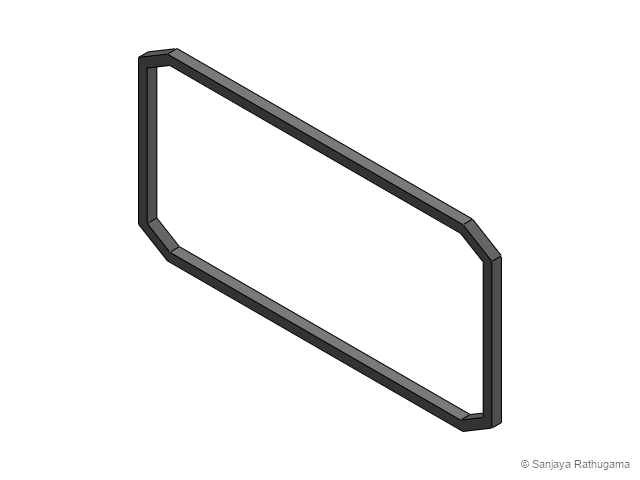
The internal ribs are MDF. I cut and shaped the MDF with my jigsaw and sander, giving the frame its repeated clipped-corner profile. Aluminium members connect the ribs, while the custom printed brackets and holders locate the optics and other components. It is a mixture of woodworking, metalwork and printing, each doing a different job.
The 3D printed parts were the holders, brackets and fittings. I first made those in PLA, then reprinted them in black PETG once the designs had proved themselves. The large MDF ribs were cut and sanded by hand. Having a printer was useful, but so were the jigsaw and sander.
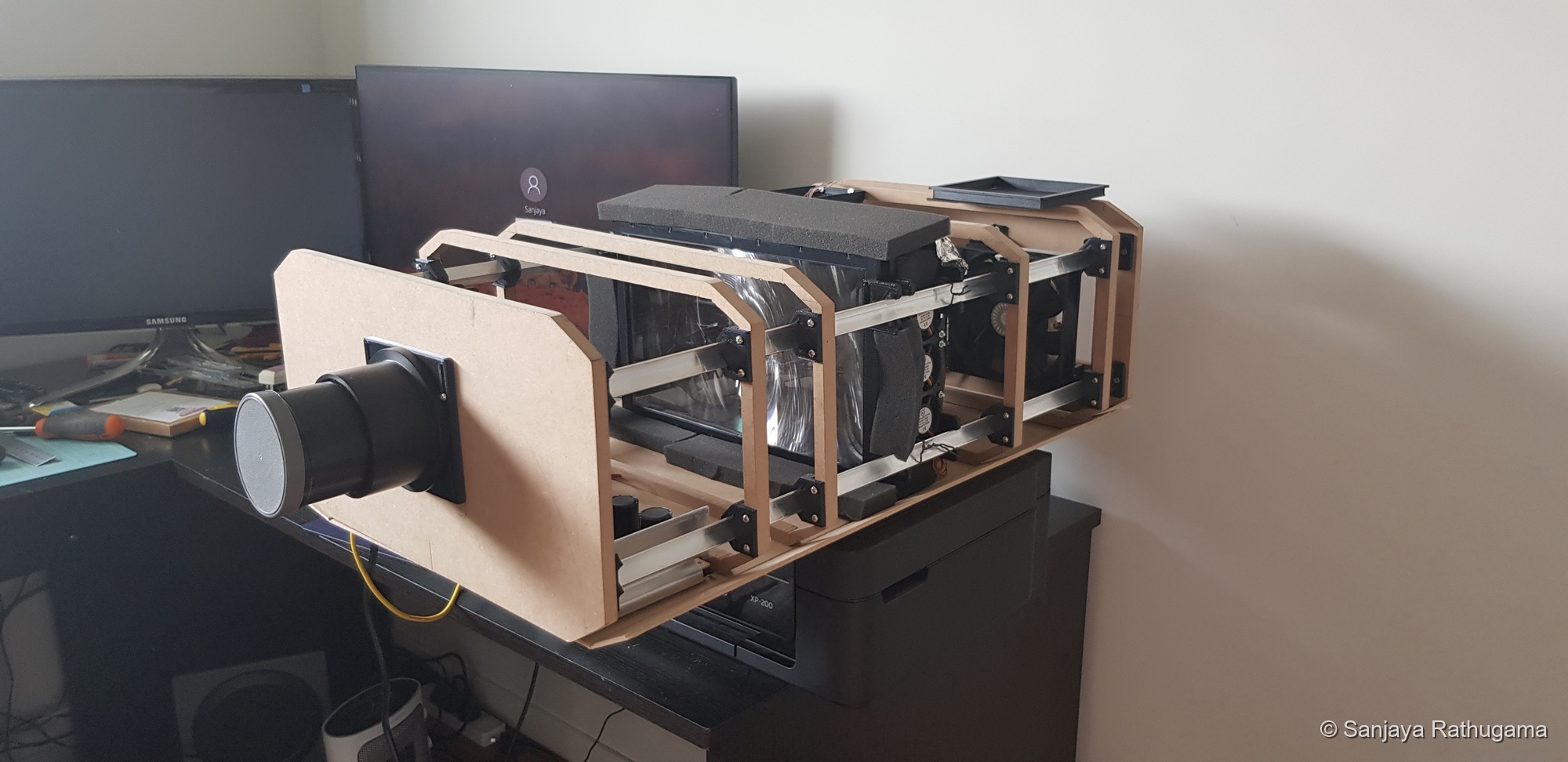
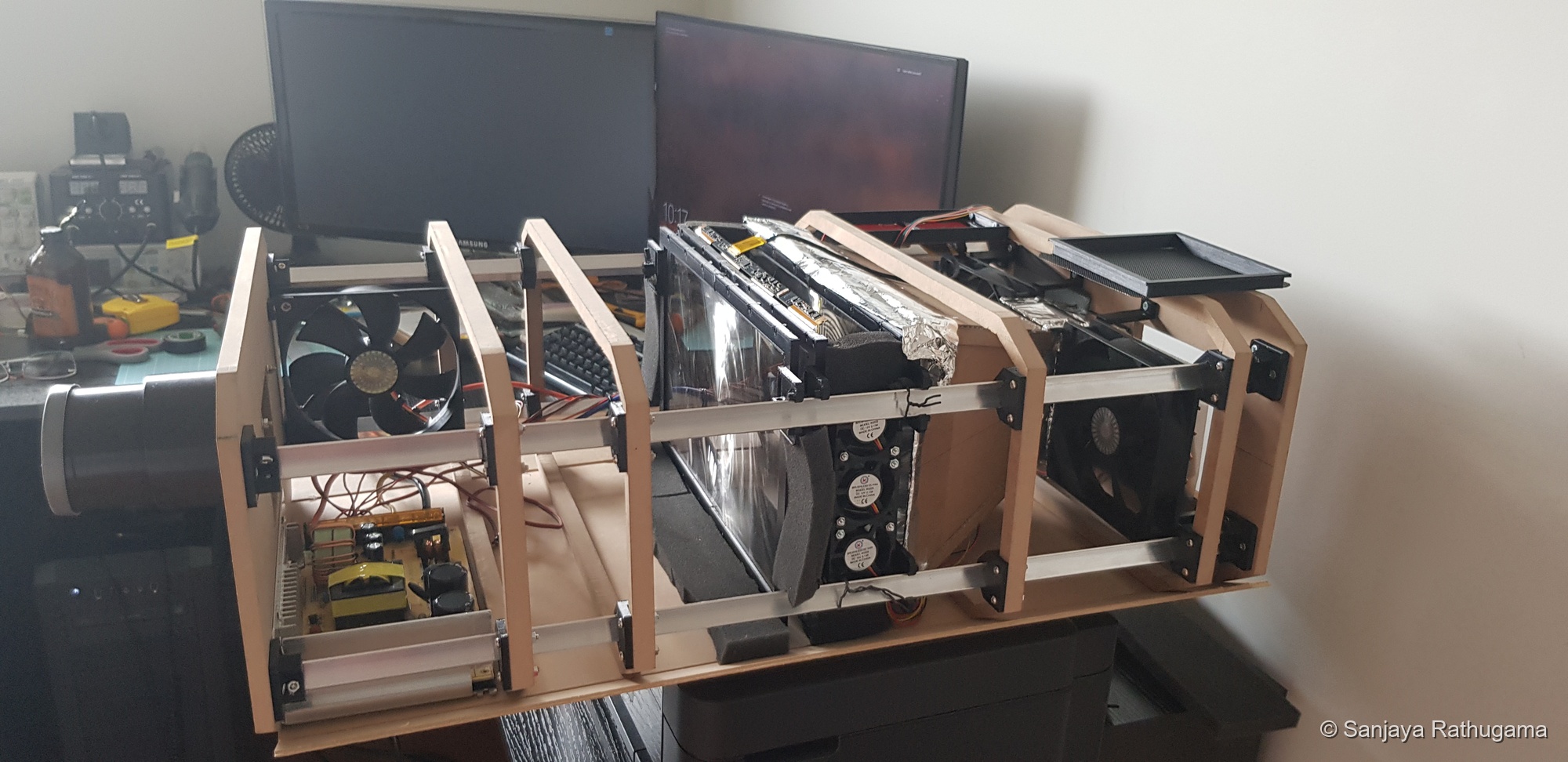
As I worked towards installing the projector, its position directly above the seats became another important requirement for the structure. I had to consider its weight, the forces on the structure and how the components and installation would be fastened.
Thinking through what could go wrong
Several parts of the project needed more care than simply getting a picture to appear. The LCD was fragile, the light source generated heat, the optics needed to remain aligned, and the completed assembly would be installed overhead.
I addressed those concerns through the way I developed the build:
| Concern | How I addressed it |
|---|---|
| Committing to an optical arrangement that did not work | Calculations followed by adjustable fixtures and physical tests before enclosing the assembly. |
| Printed parts needing fit or design changes | PLA prototypes first, then black PETG parts once the design had proved itself. |
| Heating the LCD and LED assembly | Directed LCD airflow, a finned LED cooler, exhaust ventilation and temperature monitoring. |
| Cutting power before a cooling period | An operating sequence that switched off illumination before the delayed final shutdown. |
| Supporting the projector above the seating | Careful consideration of weight, forces and fastenings, using a commercial mount with my fabricated extension pole. |
The broken first panel was a reminder that these concerns were practical. A design could be correct on the screen and still be damaged during assembly. It also made the distinction between a printed part fitting and a fragile component being forced into that part very real.
Designing the airflow around the LCD and LED
Cooling had to be part of the layout while the frame was still open. There were two different areas to deal with: the illuminated LCD and the high-power LED assembly at the rear.
The LCD was designed to work with its original backlight, which I had removed. In the projector it was exposed to my own much stronger illumination system. Some of the incident light is absorbed in the panel assembly, including its polarisers and colour filters, and that energy becomes heat.
I wanted to avoid local overheating that could disturb the image and produce dark patches. Excessive heat can also damage display materials. Cooling the LED alone would not take care of the LCD, so I needed to direct air where the panel needed it.
The cooling arrangement uses a large intake fan, roughly 120 mm, and a vertical bank of small fans beside the LCD, roughly 30 mm each.
Their job was to help move air through the available passages around the panel and across its surfaces. Air does not pass through the solid LCD itself. The important part was carrying heat away from the illuminated area, rather than merely circulating air somewhere inside the enclosure.
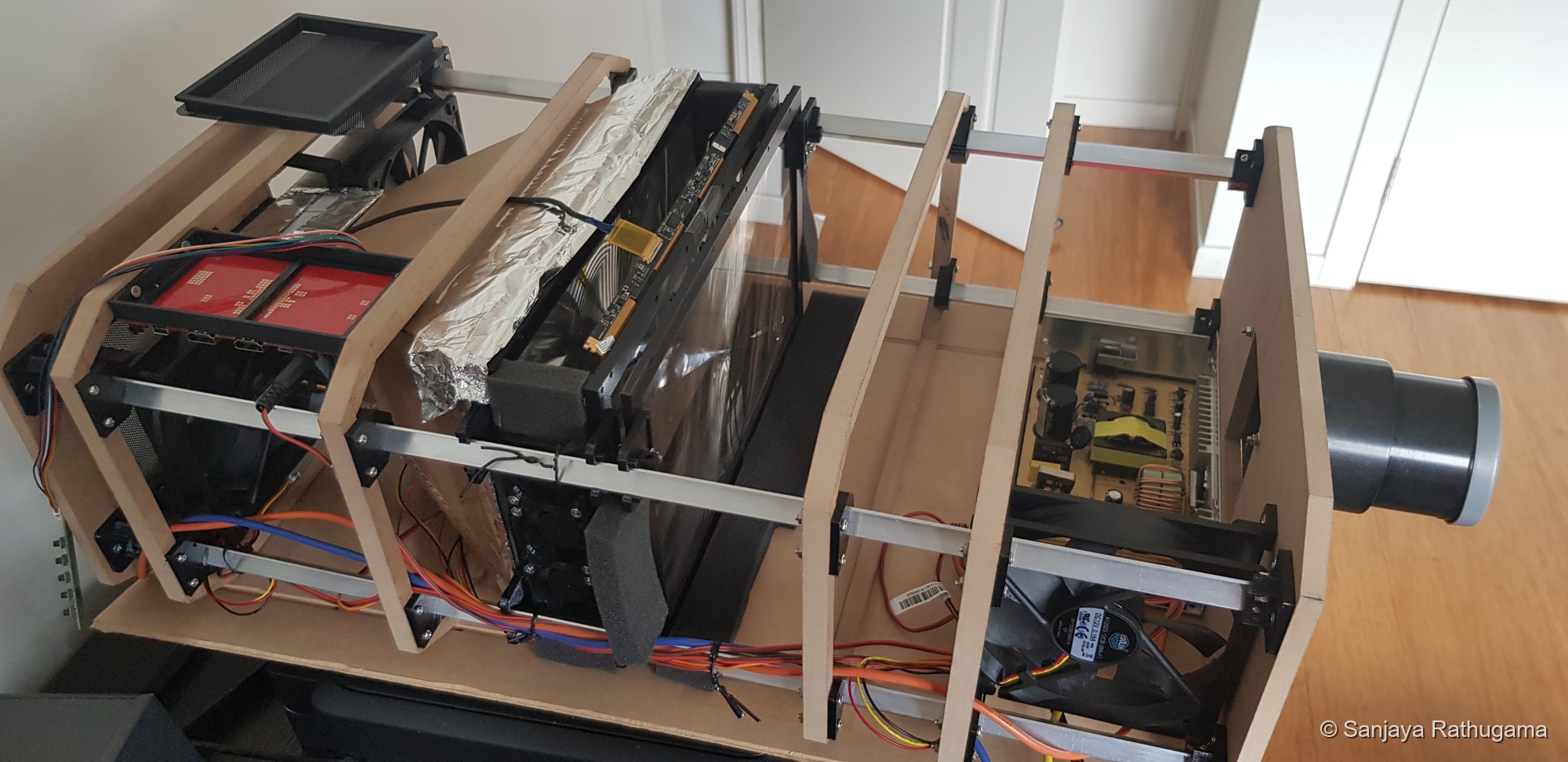
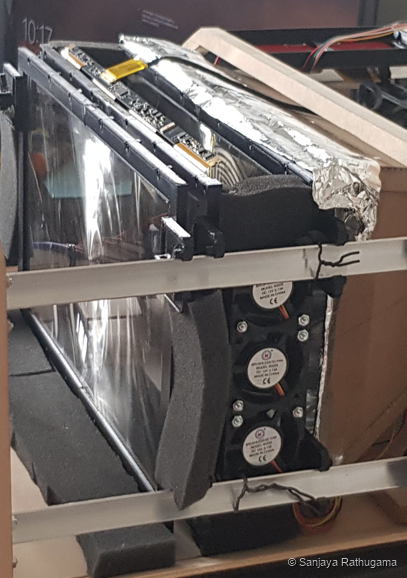
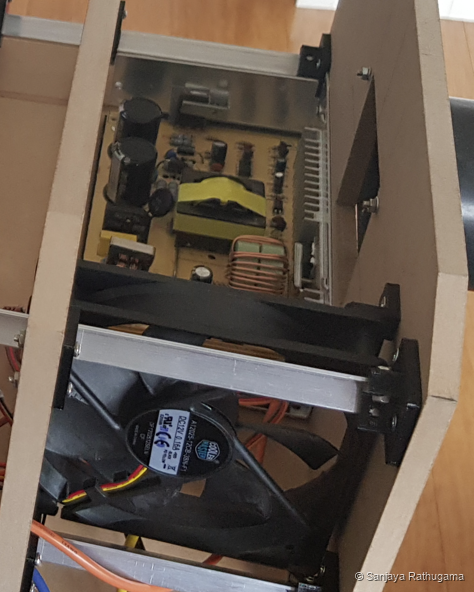
The intake position is one of the details I am still working through as the layout develops.
The large intake supplied air to the enclosure, while the small fans addressed the restricted region beside the LCD. That distinction mattered because the panel sat between optical elements and their mounts. Air could take an easier route around the assembly without adequately cooling the area I was concerned about.
There are strips of foam around parts of the optical assembly, filling gaps around the mounts. The printed fittings define the local openings and mounting positions. All of this takes up space, which is why I have to plan airflow around the actual optics and structure.
Ventilation also depended on the resistance of the completed case. Openings, mesh, narrow passages and obstructions all affect how much air a fan actually moves. Adding the free-air ratings of the fans would not tell me the airflow through the LCD region. The intake and exhaust had to provide a usable path through the assembled projector.
I have designed the fan holders, airflow fittings, heatsink supports and brackets alongside the optical mounts, so the cooling components fit into the space available around the lenses and LCD.
At the rear, another two large fans, roughly 120 mm each, exhaust air from the LED cooling region. The LED was mounted to a finned heatsink assembly. Heat had to travel from the LED into that assembly, then transfer from the fins into the moving air and out of the case.
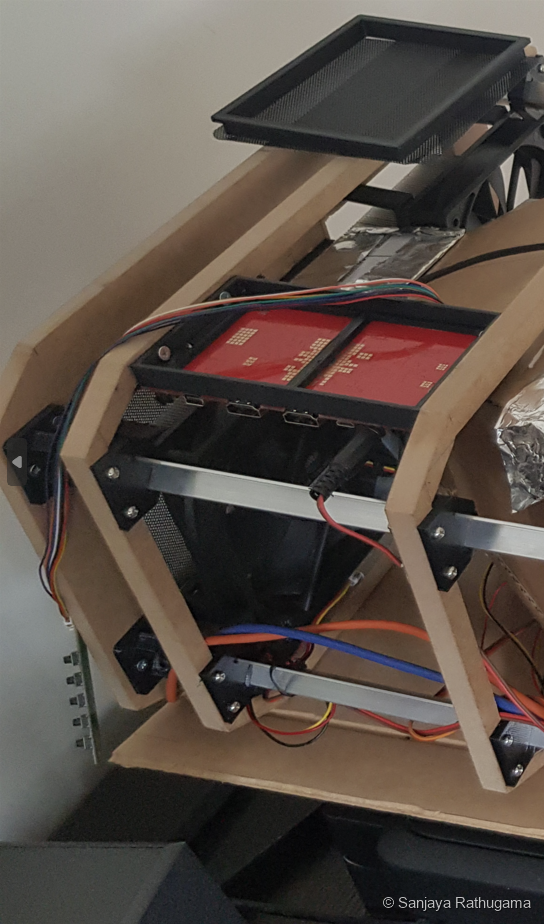
This meant the LCD cooling and LED cooling had different tasks within the same enclosure. The LCD needed airflow around an illuminated optical element, while the rear assembly needed airflow through the heatsink region to remove heat from the source.
For the LED, the thermal path was from the emitter into the heatsink assembly, then from the fin surfaces into the air. The exhaust fans helped carry that warmed air outside. A heatsink with no effective air exchange would eventually be working in an increasingly warm enclosure.
For the LCD, the concern was local temperature under illumination, rather than only the air temperature somewhere else in the case. The original Sharp module datasheet lists an ambient operating range of 0 to 50°C. That is a module specification, not a measured temperature for my modified panel, and it is separate from a temperature reading taken near the LED. It reinforces why cooling the display could not be reduced to checking the LED's sensor.
The AVR controller also needs to coordinate cooling with the power sequence. I want the LED to switch off first and the fans to keep running for a cooling interval before final shutdown.
Testing the optical assembly on a white wall
Here are two recordings from the October bench tests. These came before the November construction photographs above; I have shown the open build first so the arrangement behind the projected picture is easier to follow.
I recorded these clips on my mobile phone simply to document progress. They give a useful record of the projector working, but they do not do justice to the picture I could see in the room. The phone was recording a projected image, rather than capturing the video signal directly, and the recordings are 1920 × 1080 rather than 4K. Exposure, focus, white balance, compression and the display used to watch them can all affect how they look.
These are quick progress clips, so they are useful for showing it working rather than measuring picture quality.
First recording: 14 October 2019
Early projection onto a white wall, with sunlight still entering through gaps around the window coverings. Mobile-phone recording of YouTube test footage, approximately 38 seconds. The displayed footage belongs to its respective creators; this recording documents the projector test.
The room conditions were part of these tests. Light entering around the windows affected the picture, independently of what was happening inside the projector.
Later recording: 26 October 2019
26 October 2019. Another projection test, with the windows covered more thoroughly. Mobile-phone recording of YouTube test footage, approximately 41 seconds. The displayed footage belongs to its respective creators; this recording documents the projector test.
The projector is receiving a 4K signal and displaying an SDR picture in these tests. The original YouTube demonstration material is HDR, but this setup is running in SDR.
The clips use different scenes and recording conditions, so they are not a controlled comparison. Still, seeing an actual picture on the wall makes the whole idea feel considerably less wild.
Build update | December 2019
Enclosing the build
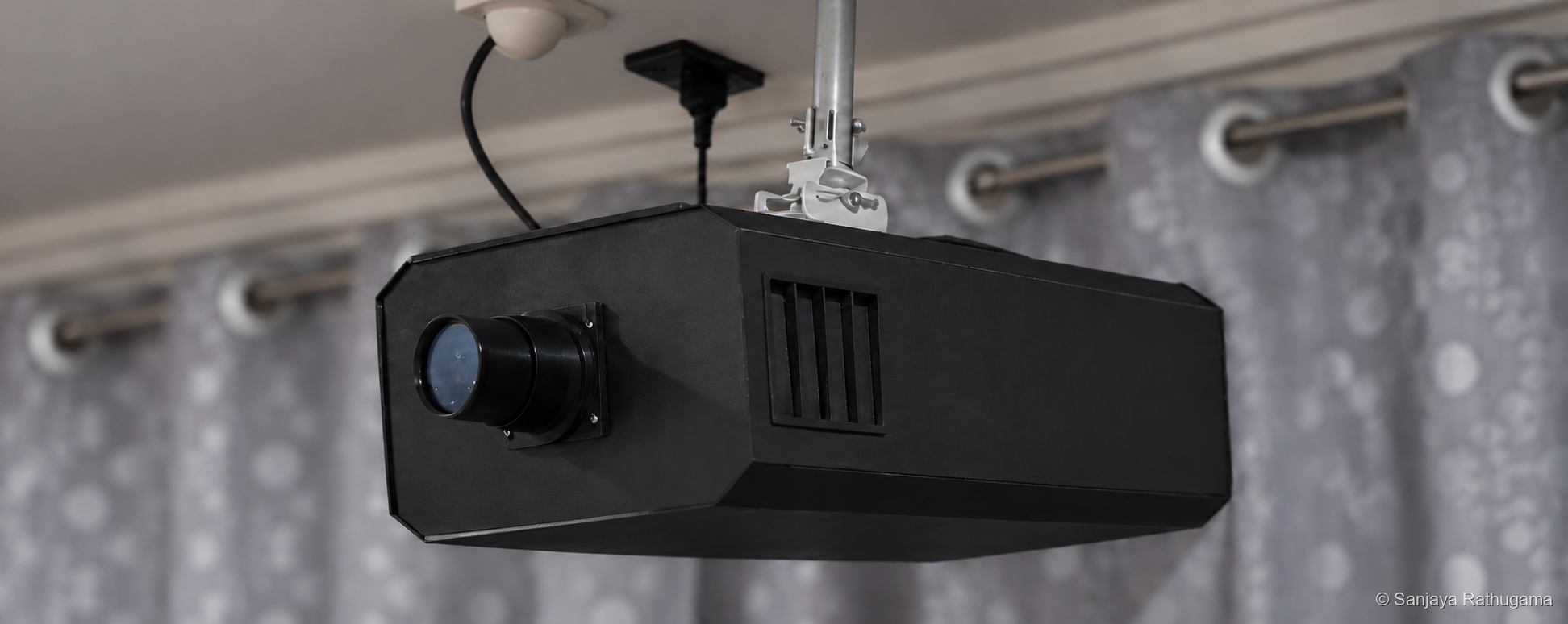
I used 3 mm MDF for the thin outer case panels and a thicker 10 mm MDF board for the top, with brushed-look black vinyl bought from eBay for the exterior finish. The thin panels were held with clips, without glue. The top was a different part of the construction: it was bolted to brackets connected to the front and rear panels and the intermediate ribs, with the rest of the projector hanging beneath it.
The housing design gives an overall envelope of approximately 643 mm long × 387 mm wide × 221 mm high, including the modelled front lens housing. The main body extrusion is 600 mm long. These are the CAD design dimensions, rather than a physical measurement of the completed unit. By this point, the consequence of choosing a 12.5-inch panel is quite visible: it needs a substantial case, with room for the optical path, cooling and controls.
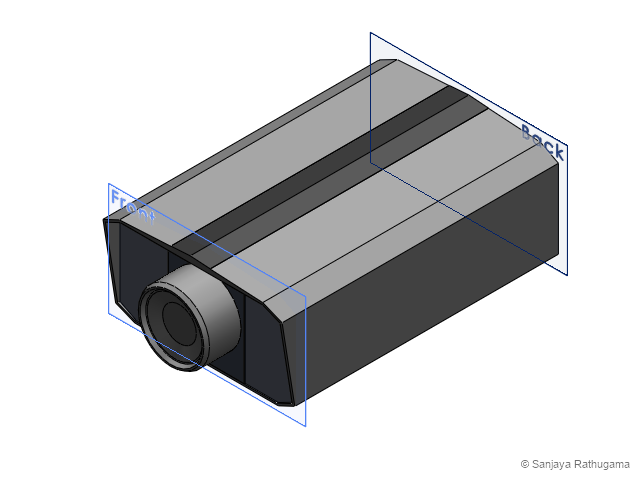
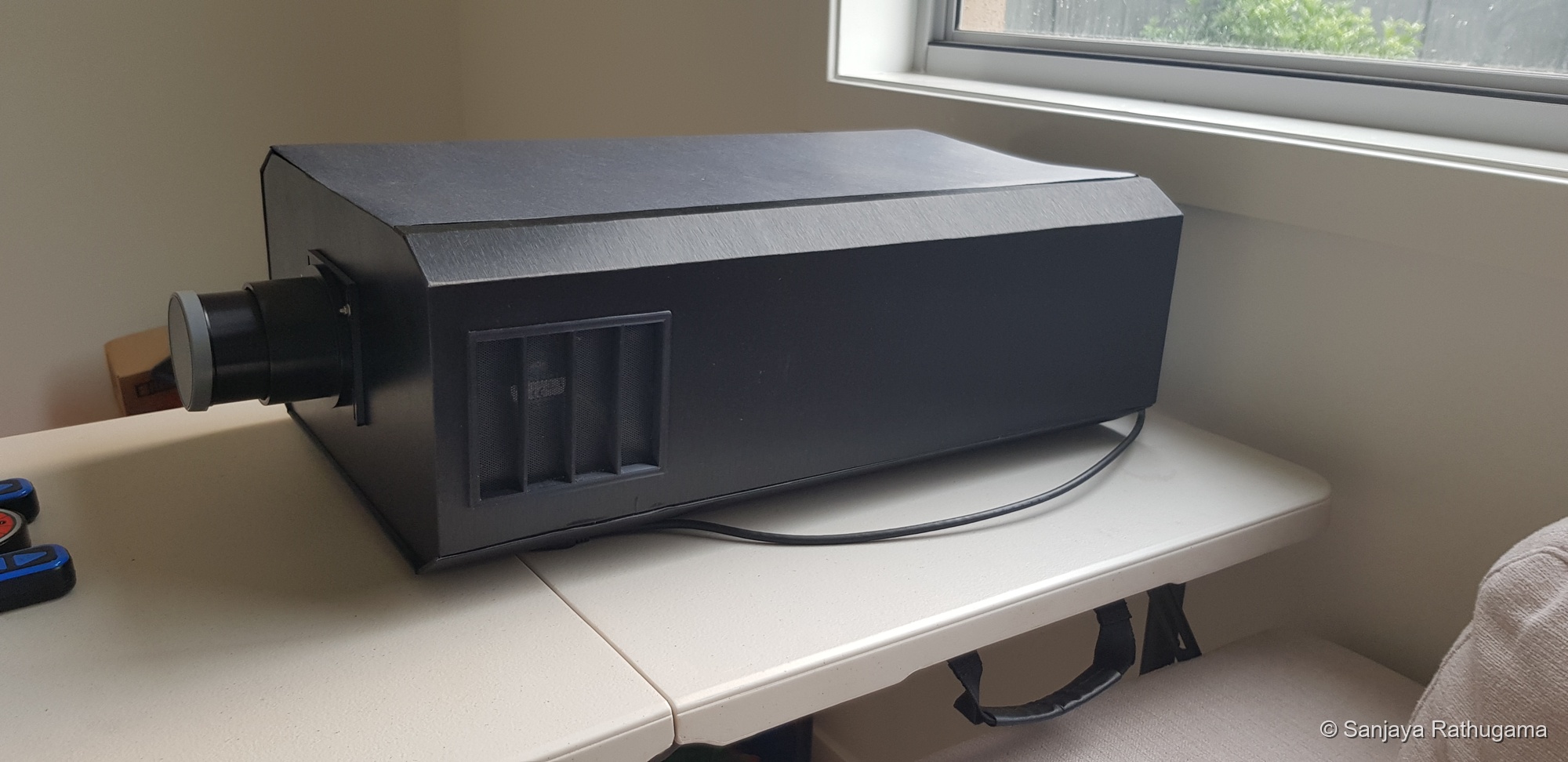
It is starting to look like a complete projector now, although there is still plenty to finish inside.
A large enclosure with a structural top
The projector takes up a fair amount of space, but it is relatively light for its size. Much of that volume is the space needed between the optical components and around the cooling passages. The size is more obvious than the weight when looking at the bare assembly.
There are two different kinds of movement to think about. The body can bend along its length, and it can twist if one section rotates relative to another. For an optical assembly, the useful question is how much the LCD and projection lens can move relative to each other. The structure needs to maintain their alignment as well as support the components.
The open prototype already has its repeated MDF ribs, longitudinal aluminium members and a bottom panel. The 10 mm top adds a substantial connection between those sections. Its bolts and brackets tie it to both ends and the ribs in between, so the suspension loads pass through that top board into the rest of the assembly. The board can resist bending and in-plane shear, while its connections help restrain relative movement between the ribs. The rigidity comes from that connected assembly, rather than the thickness of any one panel alone.
The clipped 3 mm panels close the sides of the structure and can add restraint where their edges and clips engage. Their contribution depends on how firmly those connections hold; a clipped cover cannot automatically be credited with the continuous shear transfer of a bonded skin. I would put more confidence in the bolted top, ribs and connecting members as the main explanation for the assembled projector's rigidity. The vinyl provides the finish.
That also explains why the completed enclosure deserves to be considered alongside the bare frame. Adding the top changes how the sections are tied together. Lower weight helps reduce the forces, but keeping the optical parts in position still depends on the stiffness of the structure and its joints.
Containing the light inside the case
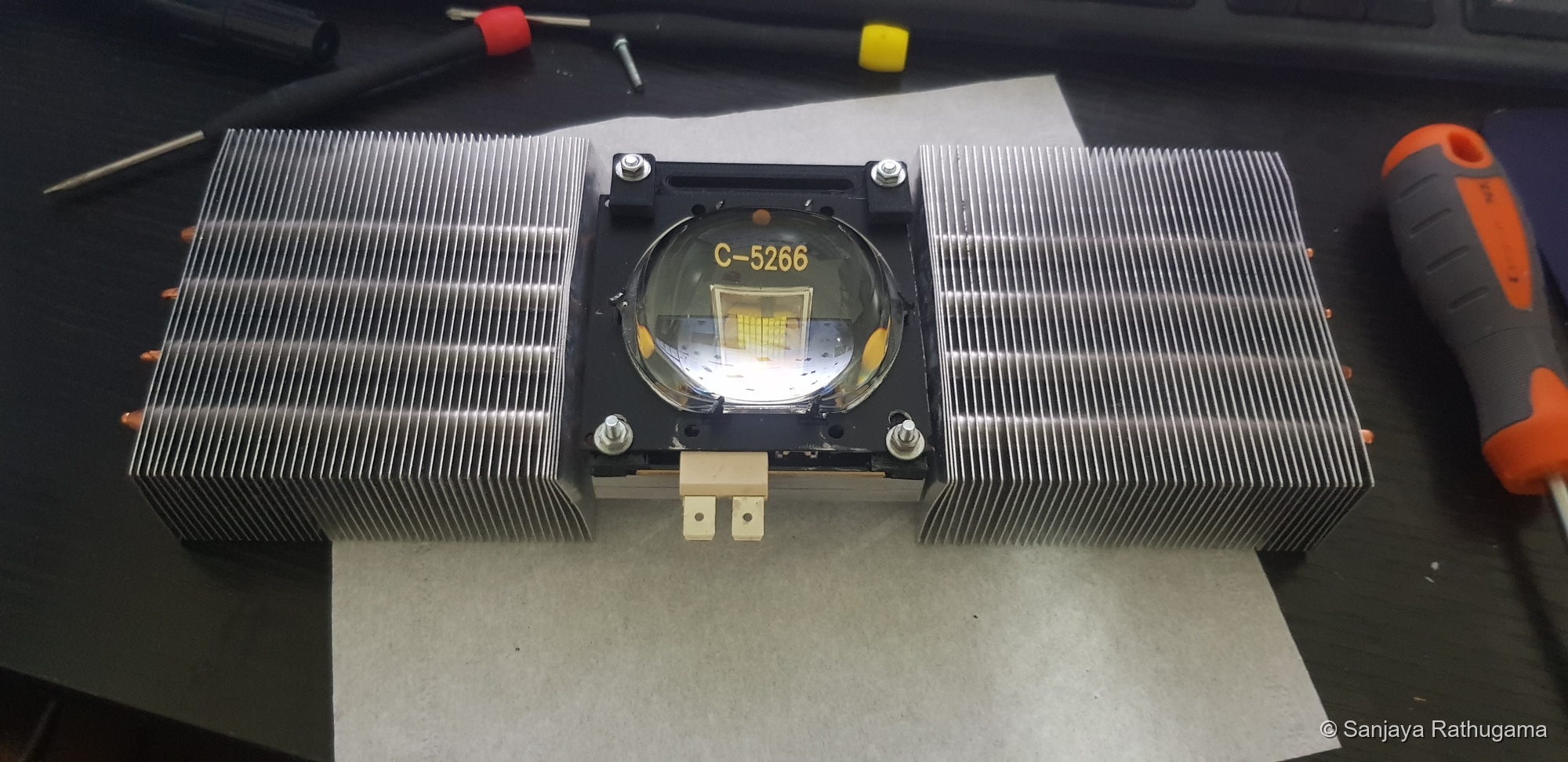
In December, I settled on the 300 W version of the C-5266 LED module from AliExpress. It brought together the compact emitting area, useful output and white-light characteristics I was looking for. The nominal 300 W rating described the LED component, not a measured optical output or screen brightness. The useful result depended on collecting its light, illuminating the LCD and directing the transmitted light into the projection lens. Alongside the cooling work, I had to deal with light escaping from the intended optical path.
Why so much light was lost at the LCD
Removing the backlight did not turn the LCD into a clear sheet of glass. It still needed its polarisers, colour filters and pixel structure to form an image. Those layers limit how much of the illumination passes through, with additional reflection and scattering losses at optical surfaces.
Some loss is fundamental to this type of display, including LCDs designed for projection. In my case, I was adapting a panel intended for direct viewing rather than a complete projection engine designed around its illumination and cooling requirements. I had to work around that constraint.
This connected brightness and thermal design. Absorbed light could heat the panel, while light that was reflected, scattered or missed the projection lens also failed to contribute usefully to the picture. Increasing LED power alone would not remove those losses.
I also experimented with reflectors. I tried ordinary foil, and made an early reflector from cardboard lined internally with reflective sheets.
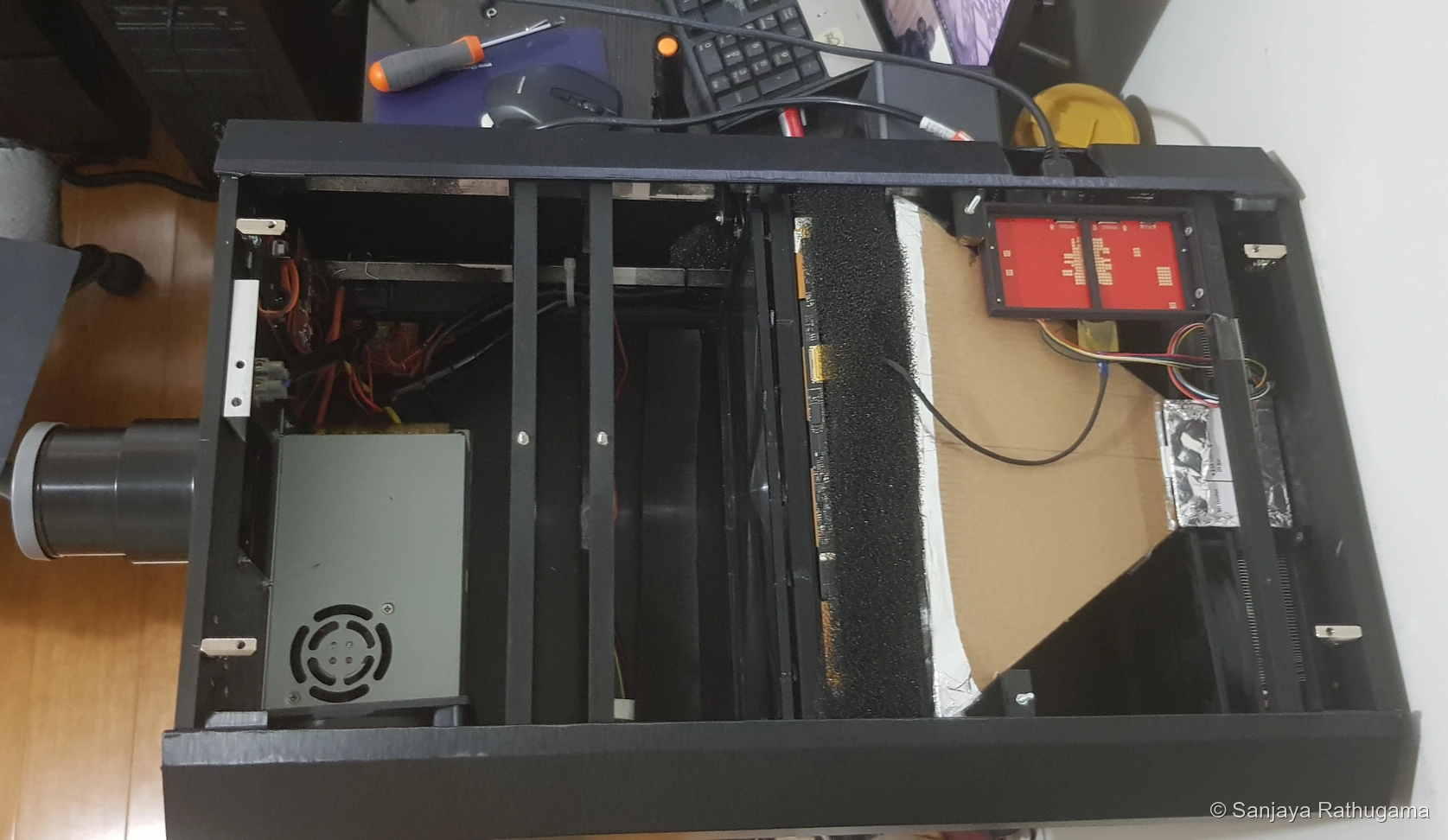
This version uses a simple fabricated reflector. It gives me something I can fit and alter while working out how to contain the stray light.
Making the electronics coordinate the projector
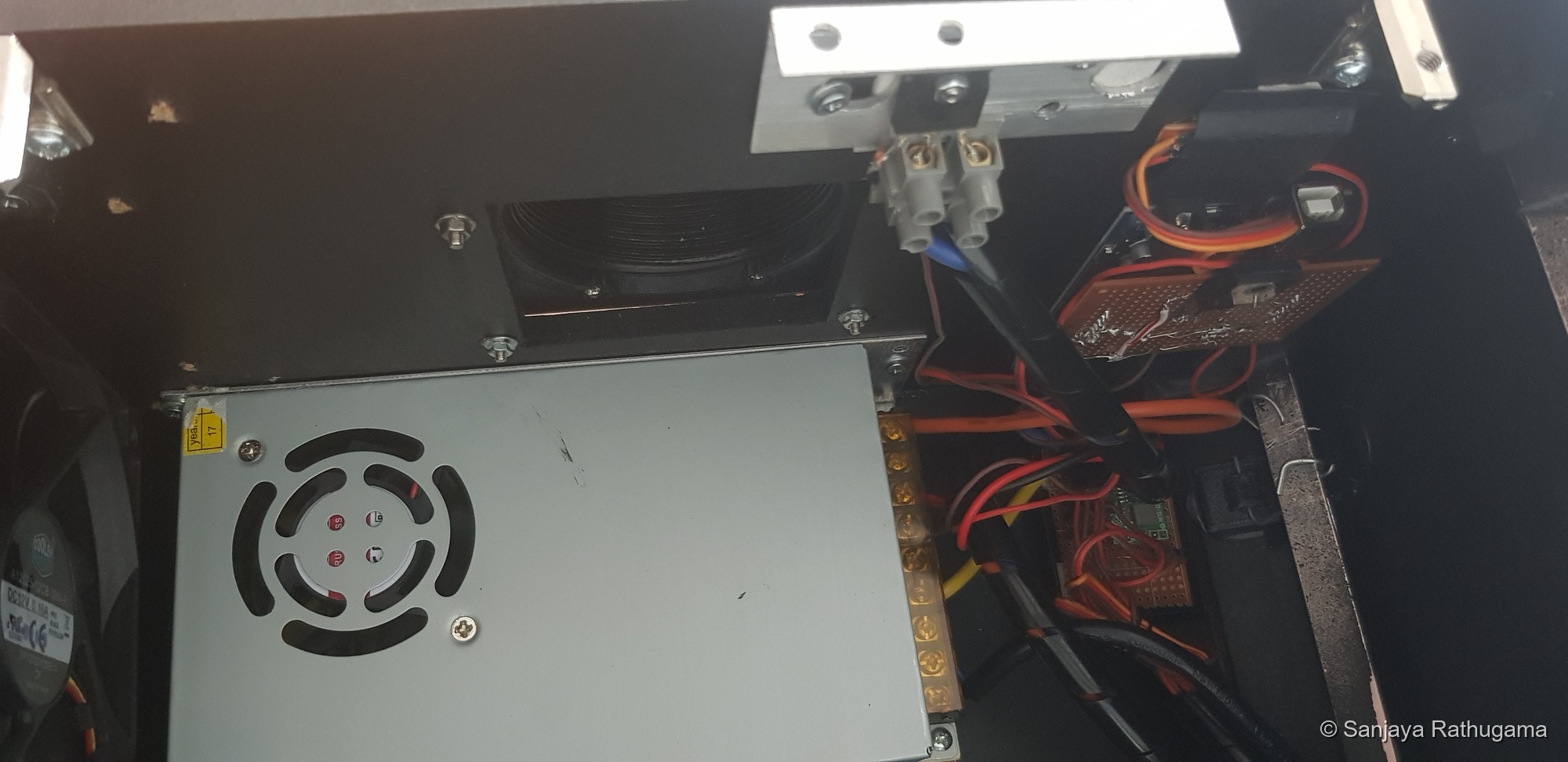
The HDMI controller and my Atmel AVR control system had different jobs. The HDMI board handled the video connection to the LCD. My microcontroller managed the projector around it: LED brightness, temperature, fans, switched power stages, IR commands and operating sequences.
Here, Atmel AVR refers to the microcontroller family, rather than the audio/video receiver in the playback setup.
Separating those roles let me build the operating behaviour around the display hardware. The microcontroller did not need to decode or rotate 4K video to manage when the light source came on or when the rest of the system shut down.
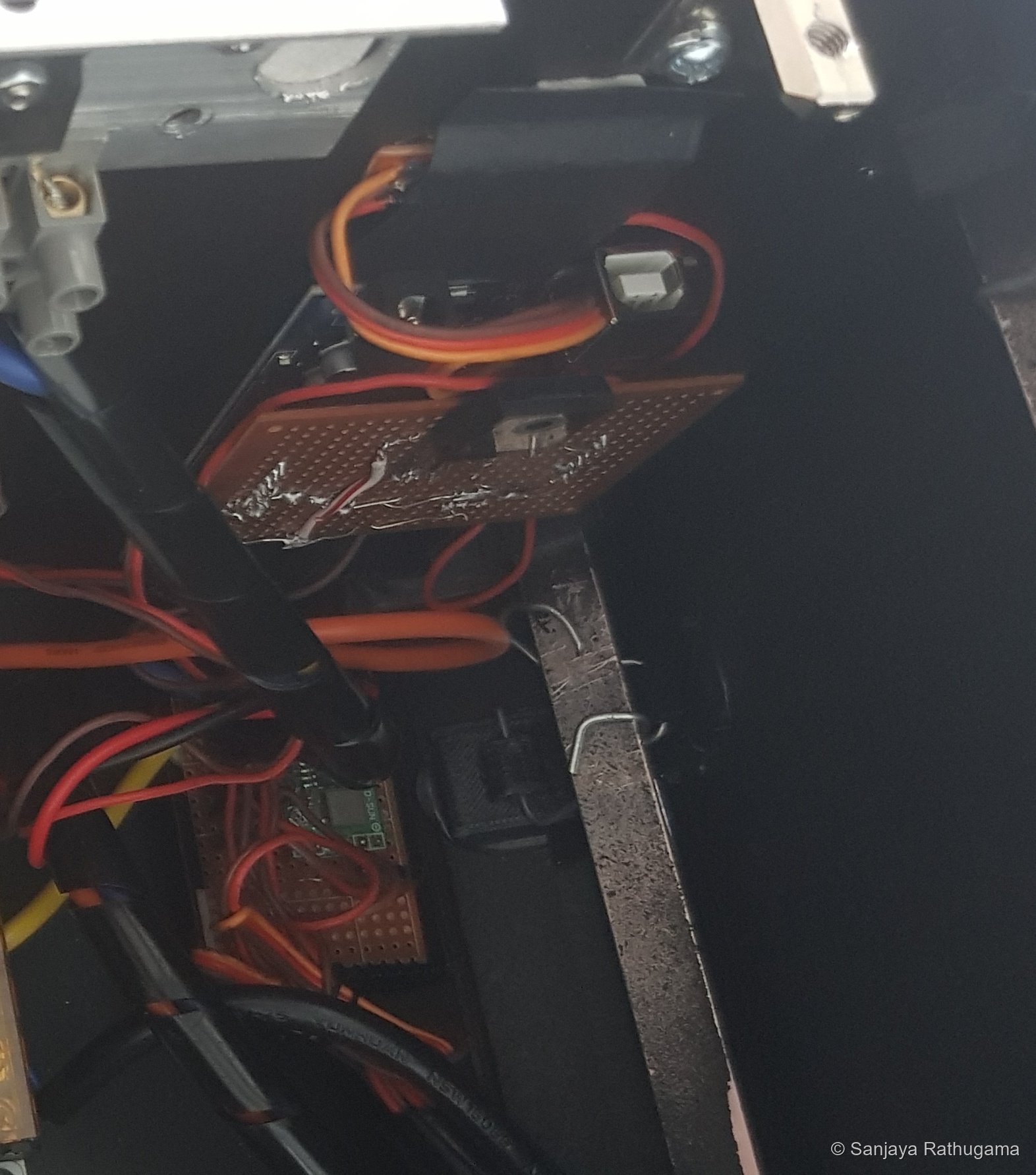
Receiving commands from the remote
The IR receiver provided the input for remote operation. My AVR code decoded the remote's commands and used them to switch system power and illumination, adjust brightness and start the operating sequences. The receiver was a control input; the separate power and driver circuitry handled the loads.
Starting and stopping in the right order
I wanted one system to operate from the remote, with a sequence behind that command. The display supply comes on before the projection LED. On shutdown, illumination goes off first and cooling continues before final system power-off.
I approached this as a small sequence of operating states, scheduling the changes rather than putting the whole controller into one long delay. That gave me a way to work on startup and cooling behaviour while continuing to handle remote commands.
Brightness adjustment
I use the microcontroller's PWM output to control LED brightness. The signal passes through a driver transistor to control a MOSFET switching stage. The microcontroller handles the timing; the MOSFET handles the power switching. Changing the duty cycle adjusts the average illumination without asking an AVR output pin to carry the LED's current.
The remote gives me a few preset brightness levels for immediate access, as well as step-up and step-down commands for finer adjustment. I can jump straight to a setting and then nudge it to where I want it, all from the seat. This is manual control of the LED's overall output.
I also want to explore automatic LED dimming at a later stage. For now, the presets and incremental adjustment give me a practical way to control illumination while watching.
Temperature monitoring and the cooling interval
I added thermistor monitoring to the controller so temperature could be part of the operating logic. The aim was to switch off illumination if the assembly became too hot and allow it to cool before restarting.
The sensor reading still needs to be understood in context. It is not the LED junction temperature, and it does not tell me the temperature everywhere across the LCD. The airflow, heatsink and panel cooling have to do their jobs physically; a software threshold cannot replace them.
Detecting standby without decoding the video
I also used an LDR input to sense an optical indication of the LCD's standby condition. That gave the controller a way to respond without interpreting the HDMI data stream, with the aim of switching off illumination when it was not needed.
The control system was another part of the prototype that I could refine through use, alongside the optics and mechanical layout.
End-of-year room tests
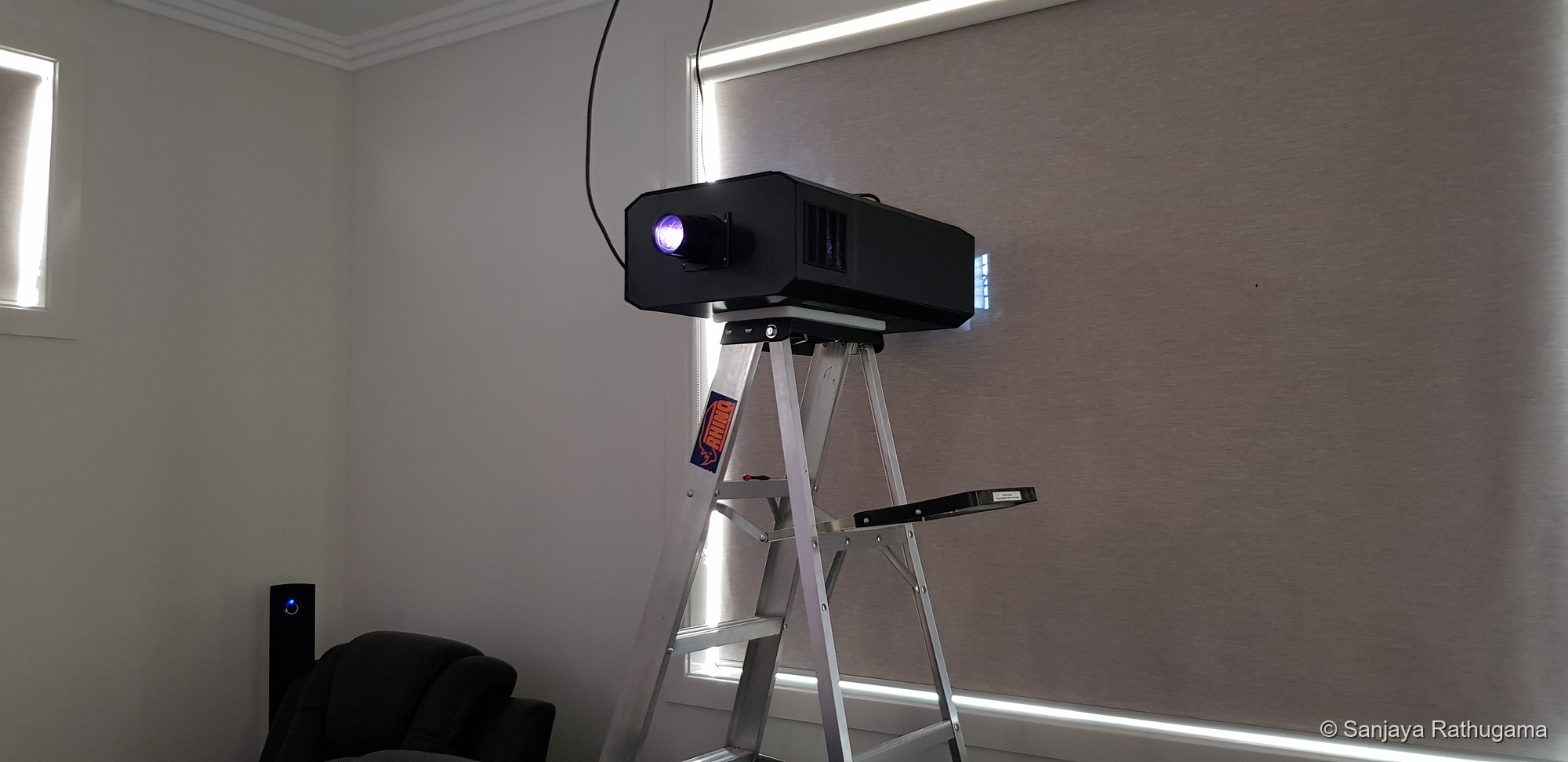
This test configuration has no reflector cone fitted. The lined-cardboard version shown on 28 December was one of the arrangements I was trying as I worked on containing the stray light.
The ladder gives me a temporary test position while I work towards installation. The light escaping into the room is still something to address before calling the enclosure finished.
Installation update | January 2020
Hanging the projector
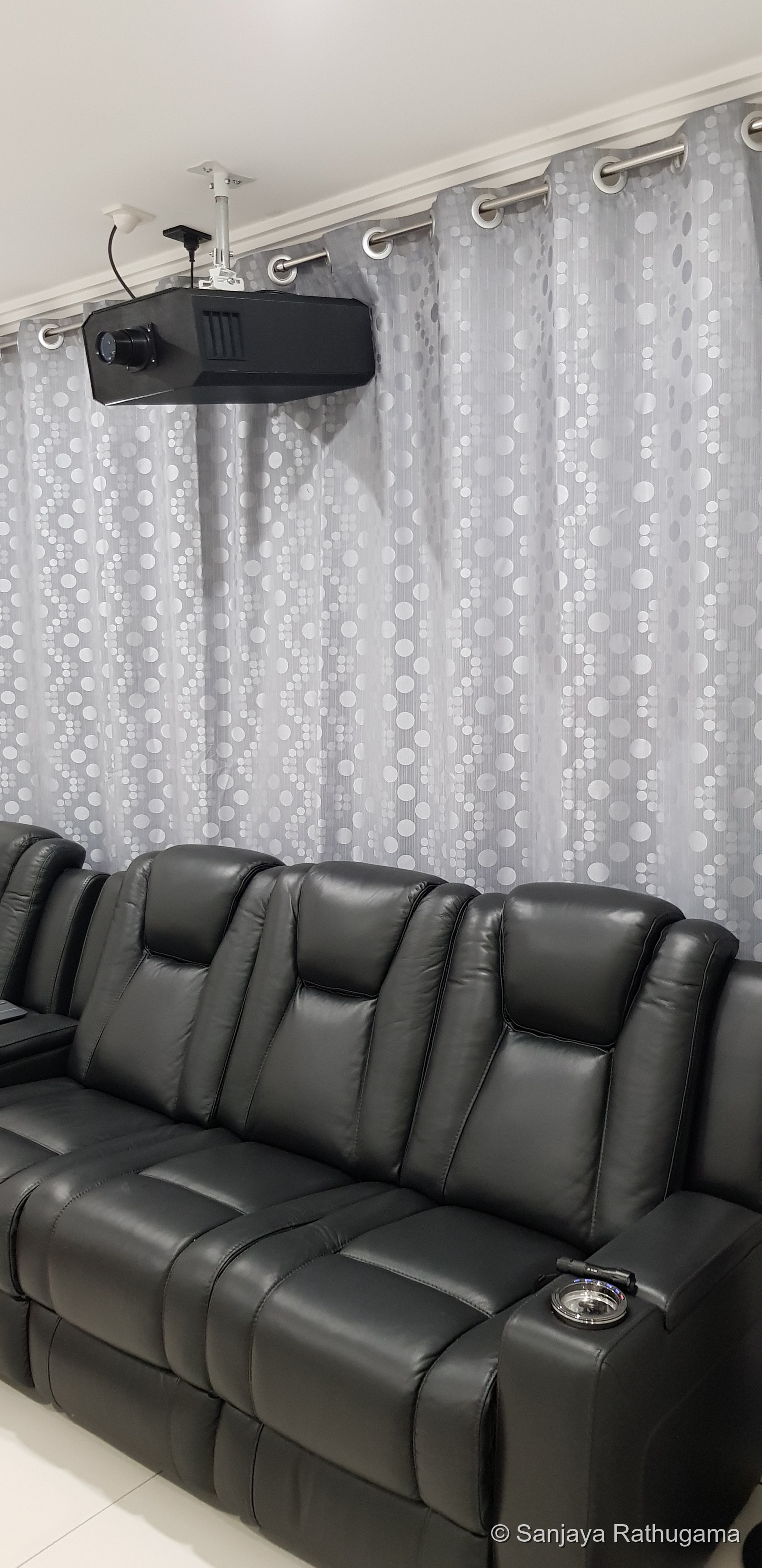
I used a commercially produced projector mount, with a custom extension pole to lower the projector further from the ceiling. I fabricated the pole from metal tube bought at Bunnings. Most of the nuts, bolts and other general hardware came from there too.
The 4 m room made the final positioning tight. To get the roughly 3.6 m projection distance while still making room for the projector itself, I had to push the projector back into the window recess. Those few extra centimetres made the layout work. The room was part of the design problem too.
Without lens shift, physical positioning involved a compromise. Tilting the unit helped position the image, but projecting at an angle to the screen could introduce keystone distortion, where the picture becomes trapezoidal rather than rectangular.
Optical keystone adjustment with the front Fresnel
I tilted the front field Fresnel to compensate for the angled projection, making the keystone correction optically rather than reshaping the video image. That adjustment works on the optical geometry; it does not provide lens shift.
The Fresnel adjustment gave me another way to work with the installed projector position. I still had to check focus and alignment. Correcting the picture's shape did not by itself guarantee that every part of the screen would share exactly the same best focus.
The bench setup has become an installed projector, complete with its own frame, enclosure and controls. That feels like quite a step from wondering whether I could build one at all.
Bringing it into focus
The projector is producing a detailed picture that I am very happy with. I can bring the main image into sharp focus, and the adjustment itself is straightforward.
The inconvenient part is doing it manually. I adjust the lens at the projector, walk over to the screen to inspect the result, then go back for another small adjustment. Finding the setting I want can mean a few trips between the two.
Once adjusted, I can enjoy the picture. It is the walking back and forth that makes remote focus sound rather appealing now.
I am pleased with how it has come together physically too. The MDF enclosure, with its 3 mm cover panels, bolted 10 mm structural top, brushed-look black vinyl and custom mounting parts, makes it feel like a complete unit. The exposed frame and loose components from the early tests are now inside a finished enclosure.
What the experiment cost
The projector build came to a little over A$1,000 before replacing the LCD I broke. Including the replacement and order charges, around A$1,250 is a reasonable estimate for the overall experiment.
Here is a breakdown of the main purchases and materials. Figures are approximate and shown in Australian dollars.
| Component | Approximate cost (AUD) |
|---|---|
| Original 12.5-inch 4K LCD and controller kit | A$257.37 |
| 200 W LED module | A$61.11 |
| Copper-tube cooling component | A$54.88 |
| F345 projection lens used in the final arrangement | A$64.97 |
| Replacement bare LCD | A$225.14 |
| F260 projection lens tried during development | A$144.69 |
| 300 W LED module | A$85.41 |
| Fans, electronics, MDF, vinyl, aluminium, PLA/PETG and miscellaneous hardware | Approximately A$350 |
| Approximate total | A$1,243.57 |
The smaller purchases added up too: fans, electronics, MDF, aluminium, vinyl, printing filament and all the nuts, bolts and fixings needed to bring it together. The build cost includes parts I tried and replaced during development, as well as the components in the finished projector. That is part of the price of experimenting.
That budget covers the projector itself; the receiver, speakers and later madVR PC are separate projects. My own design and workshop time is another matter. If I started charging myself for all those evenings, the budget would become considerably less impressive.
The replacement panel was an unwelcome addition, but even with that mistake included, I had a working native 4K projector for a fraction of the cost that had put me off buying one. I had also gained an education in optics, cooling, fabrication and how firmly not to push an LCD into a printed frame.
In-use update | Understanding the picture
With more time to watch the picture, I have noticed two smaller weaknesses. The edges are slightly darker than the centre and a little softer in focus than the main image area.
Those observations have sent me back to researching the optics. I want to understand why the picture behaves that way and which parts of the arrangement might be contributing. There is now something specific to explain.
Understanding the darker edges
My first suspicion was the large LCD and the way the condenser concentrated the illumination. Through further reading, I came to understand that the broader issue was illumination uniformity across the image, along with how much of the light from each part of the panel could reach the screen.
The condenser's illumination pattern was one factor to consider. I also learned about vignetting, where apertures or parts of the optical assembly clip some of the light, and lens-related illumination roll-off towards the edges of the image.
That helped me look at the complete light path rather than blaming one component. A lens could cover the panel's image field without delivering exactly the same brightness from every part of it. The large panel, collection optics, clear openings and alignment all had to work together.
I have not measured the contributions separately, so I cannot isolate one cause. This gentle edge fall-off is also different from the heat-related dark patches the LCD cooling is designed to prevent.
Understanding the softer edges
The slight edge softness led to another round of reading. I learned more about field curvature, where the surface of best focus is curved rather than matching a flat screen. That helped explain how the main image could be sharply focused while the edges remained a little softer.
I also looked into off-axis aberrations and the effect of alignment. The angled installation and tilted front Fresnel added further variables to consider. These were possible contributors I identified through that research, rather than faults I could distinguish conclusively from the picture alone.
The useful lesson was that adjusting overall focus and achieving uniform sharpness across the whole field were related but different tasks. Moving the focus could bring the main image into a sharp setting without removing every optical compromise at the edges.
Understanding where the light went
The research also helped me understand why the LED's power rating did not translate directly into screen brightness. Removing the original backlight had left the LCD's image-forming layers in place. Its polarisers, colour filters and pixel structure still limited transmission, while reflection, scattering and light missing the projection lens added other losses.
Those losses were part of the system I had to work with. They also connected the optical and cooling problems: some of the light that did not reach the screen was absorbed in the panel assembly and became heat.
Judging the result in use
In normal use, these compromises are not bothering me. Watching movies and videos, I do not notice the slight edge softness, and the darker edges are not a problem. The detail and overall picture are very satisfying.
The blacks are another part of the picture that has really pleased me. In the darkened room they look fantastic to my eyes, giving darker scenes a depth that makes the whole picture feel more cinematic. Getting that from a projector I have built around a repurposed LCD is especially satisfying.
The term I have come across for the darkest level a display can produce is its black floor. In this projector, light leaking through the LCD, stray light inside the enclosure and light reflected around the room all affect how dark the screen can look. At this stage, I am judging the blacks by watching the projector in the room. These are my first viewing impressions.
The contrast is very satisfying too. It is the separation between the bright parts of the picture and those deep-looking blacks that gives the image its depth. Contrast ratio expresses the ratio between measured white and black luminance under defined test conditions. I am very happy with the contrast this Sharp LCD produces as part of the complete projector in the room.
Understanding the weaknesses has not taken away from the result. It gives me a clearer idea of where to direct the next improvements.
System update | Building around the projector
With the projector working successfully, I have bought a Denon AVR-X3600H. The receiver now gives me a reason to start building out the rest of the setup.
The playback-source, receiver and projector connection I had in mind is coming together. I started by wanting a projector; now the rest of the room is beginning to grow around it.
Optics update | September 2020
The optics experiments continued after installation. In September 2020, I ordered a rectangular condenser lens with a stand intended for a 16:9 LCD. It cost A$19.94 including delivery, separate from the original build budget. It was another option to try as I worked on matching the illumination to the panel's shape.
Further development | May 2023
Catching the HDR bug
I kept researching after installing the projector in early 2020, and eventually caught the HDR bug. Of course I did. Getting a native 4K picture working had apparently not given me enough to tinker with.
I wanted to make better use of HDR material, but I could not find a suitable HDR-capable controller board for the Sharp panel. Even if I found one, accepting an HDR signal would only solve part of the problem. The source's brightness range still had to be adapted to what my projector could actually put on the screen.
That led me to external HDR tone mapping. Tone mapping adapts the source's brightness range to the display; gamut mapping deals with colours outside the display's reproducible range. BT.2020 describes a colour space used for UHD material, not a tone-mapping method. Those were connected problems, but they were not the same problem.
A Windows PC running madVR
This was where I discovered madVR, the video renderer for Windows. I was impressed by what it could do and slightly annoyed with myself for only finding it after the projector was already installed. Still, it gave me another route to explore.
I built a PC to use madVR for movie playback and tone mapping before sending the picture to the projector. That let me work with HDR sources while feeding the existing display chain a tone-mapped SDR signal. It did not require the projector's controller to interpret the original HDR signal itself.
There was a familiar catch: normal playback through that setup came from the computer. I still wanted to use the Nvidia Shield. The next step I wanted to explore was a capture card to bring the Shield's output into the PC for processing. Capture formats, signal compatibility and the practicalities of that route deserve a separate article; they are more than a small addition to this build story.
The picture with madVR was a very satisfying improvement to my eyes. Colours had more life and the image felt more convincing. That does not mean software had expanded the projector's physical gamut to BT.2020. It meant the source material was being adapted more effectively to the capabilities of the system I had built. There was now an even better picture coming out of the damn thing, and knowing I had designed and built it made that especially satisfying.
The improvement in darker scenes was particularly striking. The blacks I already liked now felt richer, and the picture had much more depth. To my eyes, madVR made a dramatic difference to the overall impression of contrast. That is different from lowering the optical black floor: tone mapping can change how tones are distributed above black, but it cannot remove the light that leaks through an LCD displaying black. It was making better use of the projector's available range.
The automatic LED dimming I had planned earlier never made it into the build. Once the home-built madVR PC was in the system, I was pleased enough with the picture to leave that idea on the list. The remote's brightness presets and step controls remained available, but I never implemented automatic LED dimming. madVR was processing the video; it was not controlling my LED driver.
Colour calibration: another rabbit hole
I had calibrated my monitors before, so I wanted to try the same approach with the projector. I started exploring the process with my ColorMunki instrument, learning more about white point, greyscale tracking, gamma and colour reproduction. Any adjustments also needed to suit the playback path; a correction applied in the PC would not automatically carry over to a source connected directly to the receiver.
But I never finished the calibration. With madVR in place, I was already very happy with the picture, and the urge to keep adjusting gave way to actually watching things. For once, enjoying the result won over another evening of tinkering.
That leaves the calibration as unfinished work. My comments about deep blacks and satisfying contrast describe what I see on the screen; I am not quoting a measured black-floor value, a verified contrast ratio or a completed calibration result. There is room to return to that work, but the picture is already giving me plenty of reason to sit down and enjoy it.
Continuing the experiment
Across these revisions, I changed the condenser lens several times and found one that suited the 16:9 panel format better. The optical layout improved as I understood the behaviour of the actual parts, and I revised the mechanical holders to suit.
What started as a wild idea has become a working projector and a much broader learning project. I have stretched my knowledge of optics, put my electronics and programming experience to work, and developed the mechanical design and fabrication skills needed to bring it together. The unfinished parts, temporary arrangements and revisions are all part of that experiment. A satisfying picture on the screen is a good result. Understanding more about the machine producing it is another.
Technical references
Steel Construction Institute, Design of steel beams in torsion, SCI P385, 2011. General background on torsional stiffness, open and closed sections, and the role of structural connections.
Sharp LQ125D1JW34 module specification, first issue 30 October 2015. Original panel dimensions, optical specifications and operating conditions. The module specification describes the original LCD and backlight, not measured performance after conversion for projection.
Sony at IFA, 2 September 2015. The Xperia Z5 Premium announcement documents a 5.5-inch 4K UHD display.
BOE TV101QUM-N00 supplier listing, 21 January 2016. The dated stock entry supports the panel's presence in the component market before this build. It does not establish availability from the sellers I could buy from.
Sony native 4K projector launch, 6 September 2018. Period market context, including the VPL-VW295ES at US$4,999.99 MSRP. This is a US launch price, not an Australian quote or a record of the particular prices I saw.
Epson Home Cinema 5050UB launch, 9 April 2019. A period explanation of Epson's pixel-shifting approach, offered as an example of the technology rather than identification of the exact model I considered.
Multimedia projection system with image quality correction, US5975704A, published 2 November 1999. Describes optical keystone correction with a tiltable front Fresnel. This documents the technique, not a claim that my bracket follows the patent.
Epson Visual Communications Business Strategy, 11 October 2016, pages 5 and 15. Period background on the 1989 VPJ-700 and the three-panel 3LCD arrangement.
National Park Service: The Fresnel Lens, updated 16 August 2017. Background on the early-1820s development of Fresnel lighthouse optics.